AAPL +1.24% MSFT +0.72% SPY -0.18% QQQ +0.41%
Local-first desktop charting since AptiStock 2005
Home / Data Providers

Data Providers

AptiStockX is charting software. Like AptiStock, it focuses on local stock data charting and lets users choose their own data provider.

Stock charting clientBring your own provider
Important position

AptiStockX is not a data vendor.

AptiStockX downloads, imports, stores, and charts stock data. It does not guarantee any third-party provider's data accuracy, completeness, availability, licensing status, exchange delay, or subscription terms.

Provider availability can vary by symbol, exchange, country, subscription tier, API quota, exchange policy, and provider outage. Users are responsible for choosing a provider, following that provider's terms, and confirming whether the data is suitable for their own research workflow.

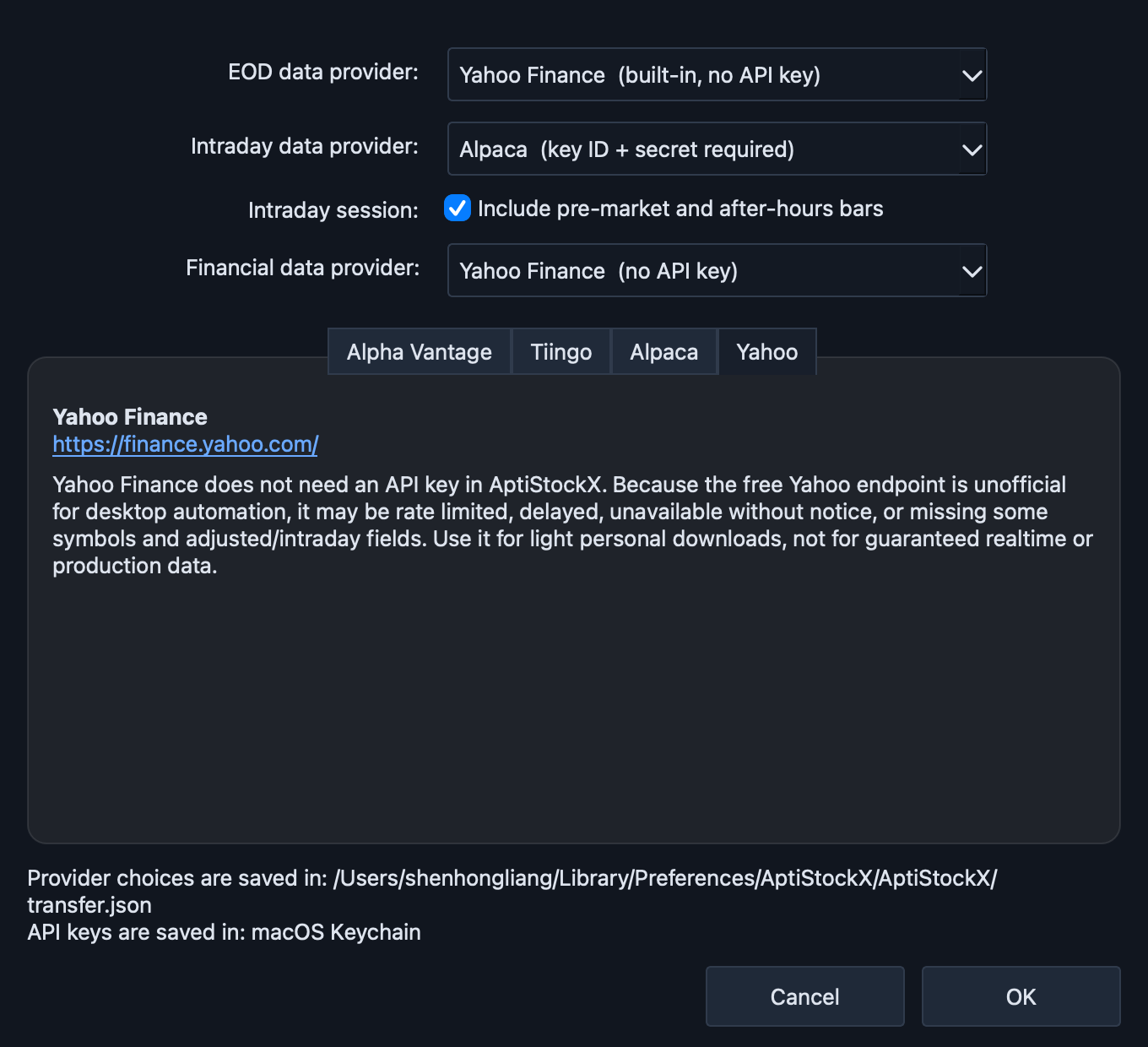
AptiStockX Data Provider Settings dialog
Supported providers

Configured from Setting > Data Provider Setting.

After you create the required provider account or token, open AptiStockX and choose Setting > Data Provider Setting. Select the provider for EOD, intraday, and financial data, then paste the required key/token into the matching provider tab.

API key

Alpha Vantage

EOD, intraday, quotes, fundamentals where account allows

Create an Alpha Vantage API key, then paste it into the Alpha Vantage tab. Use Free Tier Compatible mode unless your Alpha Vantage account supports premium endpoints.

  • Free and premium access levels may expose different limits and data delay behavior.
  • AptiStockX uses Alpha Vantage fundamentals through supported endpoints such as Company Overview.
  • Respect Alpha Vantage rate limits and terms for your account.
API token

Tiingo

Daily, intraday, quotes, and fundamentals where account allows

Create a Tiingo account, find your API token, then paste that token into the Tiingo tab in AptiStockX.

  • The API token identifies your Tiingo account usage; keep it private.
  • Feature availability depends on your Tiingo account and the selected endpoint.
  • AptiStockX stores provider credentials through the operating system credential store when available.
Key + secret

Alpaca

Daily, intraday, and quote requests

Create an Alpaca account, generate market-data credentials, then paste both the key ID and secret key into the Alpaca tab.

  • Alpaca market-data access depends on plan, permissions, and exchange rules.
  • AptiStockX needs both APCA-API-KEY-ID and APCA-API-SECRET-KEY values.
  • AptiStockX uses Alpaca as a data provider only; it is not a broker connection or trade execution path.
No API key

Yahoo Finance

Built-in fallback; no API key

AptiStockX uses native networking for Yahoo Finance EOD data and supported fundamentals. It remains an unofficial free provider path, so reliability can vary.

  • No API key is required, and no external Python install is required.
  • May be rate limited, delayed, unavailable without notice, or missing adjusted/intraday fields.
  • Use a keyed provider when provider guarantees and quotas matter.
Disclaimers

What provider support does and does not mean.

No data guarantee

AptiStockX does not guarantee data accuracy, completeness, split/dividend adjustment quality, symbol coverage, or delay time. Always verify critical data with your chosen provider or exchange source.

No data resale

AptiStockX is not a market-data reseller. Users bring their own provider access and remain responsible for provider terms, usage rights, subscription status, and API quotas.

Local storage

Downloaded EOD and intraday data is saved locally as CSV where possible. Switching providers may produce different histories or adjusted values, so AptiStockX keeps provider choice visible.

Not trading advice

Charts, indicators, line studies, and AI explanations are research tools. They are not buy/sell recommendations, financial advice, or a guarantee of future performance.